


The moment you need instructions is rarely the moment you want to look for them. You have a half-assembled chair in front of you, a handful of screws that look almost identical, and a phone that keeps dimming just as you reach step four. The folded sheet from the box suddenly earns its place on the floor. You can spread it out, compare the drawings with the parts, and keep both hands free.
We carry devices that can pull up a manual, translate a label, or play a repair video. Yet instructions still appear on clothing tags, food packaging, appliances, and the backs of bottles. Printing puts information where a decision happens. Sometimes that means a manual beside a pile of parts. Sometimes it means three words on a lid.
The product is where the question starts
A person about to wash a new sweater wants to know whether it can go in the machine. Someone opening a jar may wonder how long it will keep in the refrigerator. Both questions arise while the product is already in hand. A care tag or storage instruction lets the person answer it in the same moment.
That closeness matters long after the purchase. You might throw away the box a week after buying something, forget the brand a year later, or pass the item on to someone who never saw the original packaging. A label sewn into a garment or fixed to an appliance travels with it. The next owner can still find the information without knowing where it came from.
Placement can even communicate part of the instruction. An arrow beside a latch shows where to push. A fill line inside a container shows where to stop. Put those same instructions on a separate page and the reader has to work out which latch or which level the words refer to.
Paper fits the way people work
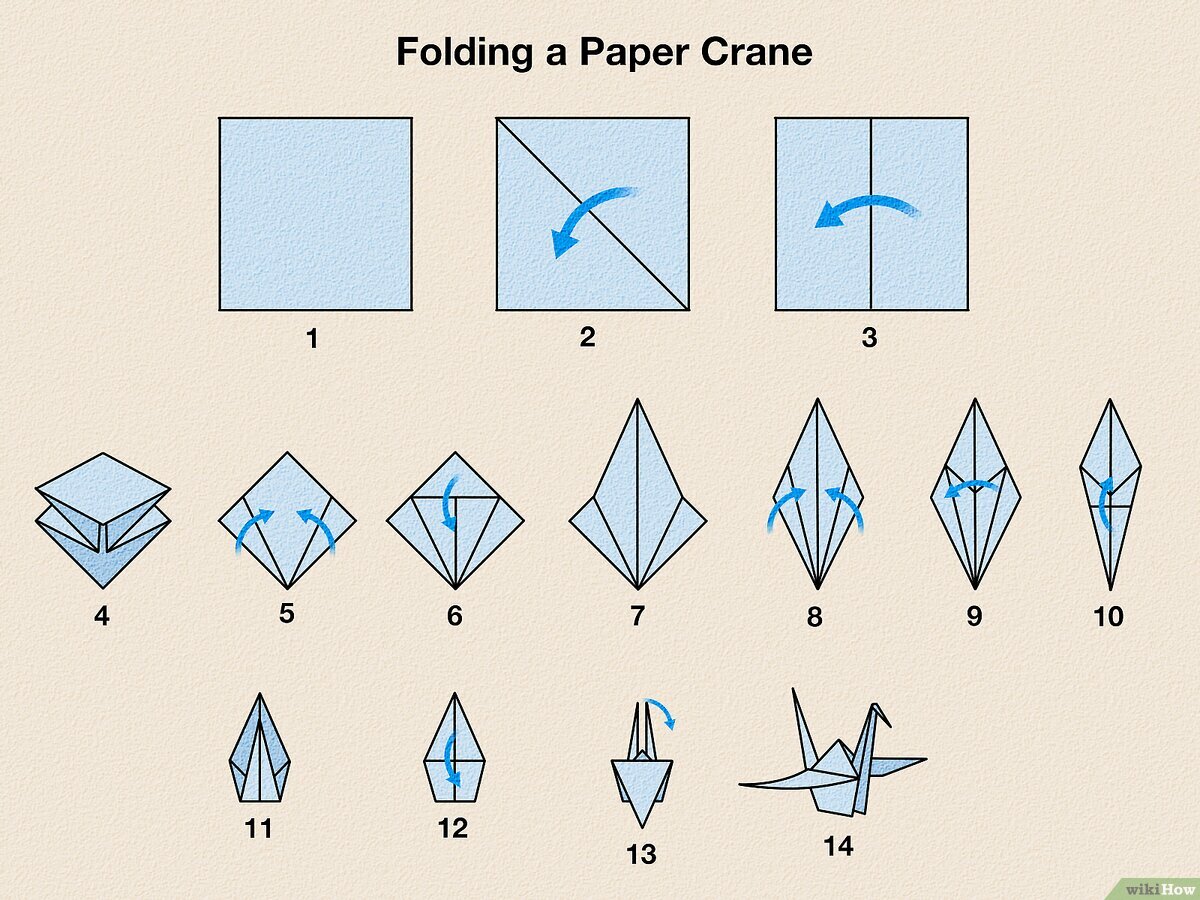
Digital instructions can show how a mechanism moves, and a video can make an awkward assembly step much easier to understand. Printed instructions are particularly handy when the job involves looking back and forth between the guide and the object. A page stays open where you leave it. You can circle a step, set a part beside its drawing, or hand the whole sheet to the person helping you.
Imagine assembling a bookcase. A drawing can show the finished unit, identify each panel, and indicate which way the unfinished edge should face. If the parts list and the diagram fit on a single spread, you can check them together before tightening a screw. That layout saves the reader from discovering three steps later that two nearly identical panels have been swapped.
The same principle applies to smaller tasks. A measurement printed on a packet can be read while you are cooking. A diagram inside a battery compartment is visible at the exact moment you are deciding which way the batteries go. Good instructions fit around the task and the person doing it.
Print keeps instructions available when access changes
A QR code can take a customer straight to a detailed guide. That works when the customer has a phone, can get online, and the link still leads somewhere useful. Over the life of a product, any of those conditions can change. Websites get redesigned. Product pages disappear. A secondhand buyer may have trouble identifying an older model that looks almost identical to the current one.
Printed details give people a place to start. A model number on an appliance can help someone find the right troubleshooting guide years after the purchase. A reset instruction printed on the device can help when the device itself is the reason the household has lost internet access.
Paper and labels have their own limits. Small type is hard to read, ink can wear off, and a leaflet can get lost. Digital text can be enlarged, translated, or read aloud when it is provided in an accessible format. A printed label and a digital guide can give readers different ways to reach the same essential information.
The smallest instructions take the most editing
There is a lot of work behind a clear label. A designer may have only a few square centimeters for directions, warnings, symbols, and several languages. Every line competes for space. Adding more information can make the whole label harder to scan, especially on a curved bottle or a narrow tag.
The most useful wording often comes from watching where people get stuck. “Turn to open” leaves the reader guessing which part turns. “Turn the gray ring” gives them something to look for. A short diagram can make the action clearer still, provided it shows the object from an angle the reader recognizes. Even the order of two lines matters. If a step depends on doing something first, the instruction should appear before the action it applies to.
Printing decisions matter too. A care label has to remain readable after washing. An instruction on a container used outdoors needs to hold up to handling and exposure. Contrast, type size, and the choice of material all affect whether someone can read the message months after it leaves the production line.
Print and digital can answer different questions
Someone opening a new coffee machine might want to know how to make the first cup. Months later, the same person may want a video showing how to clean a particular component. A printed quick-start card can handle the first task, while a digital guide offers the depth the second one needs. A visible model number helps connect the two.
The distinction is especially useful on packaging, where space is limited. The package can carry directions people need before opening, using, or storing the product. A linked guide can offer translations, demonstrations, or answers to less common questions. Each format earns its space by helping with a particular task.
The next time you turn over a packet to check a cooking time or look inside a battery cover for a tiny plus sign, notice how little effort it took to find the answer. That is what a well-placed printed instruction does. It answers a question at the moment it comes up, then lets you get back to what you were doing.